Blog Highlights
- Only 31% of projects are delivered on time, on budget, and within scope — and organisations waste an average of $97M per $1B invested due to poor project performance (PMI, 2025).
- 7 core capabilities separate delivery-grade platforms from basic task trackers — covering project planning, resource management, time tracking, financials, collaboration, dashboards, and portfolio governance.
- 3 platform categories define the market in 2026: general-purpose tools, traditional PPM platforms, and purpose-built PSA+PPM systems built for specific industry verticals.
- 5 questions every enterprise buyer must answer before selecting a platform — covering problem definition, delivery methodology, financial governance, vertical fit, and true total cost of ownership.
- Purpose-built platforms deliver 21% faster delivery cycles, 14% higher resource utilisation, 12% more billable hours, and 9% margin uplift — outcomes general tools do not consistently produce.
A project management system consolidates an entire group’s project planning, task management, task tracking, resource management and reporting in one application. At the enterprise level, it connects the dots across people, money, time and deliverables. When it succeeds, it eliminates 10 separate applications. When it doesn’t, it just adds to the pile of workarounds.
The majority of businesses get the project management software wrong. Not due to limited cost or lack of effort. They get it wrong because they select based on feature sets and because they implement it as a software project, and not as a change project. Adoption stalls. And finance slips away.
Project management software is a hub for all project planning, task assigning, progress monitoring, resource managing, and reporting in a project. For enterprise solutions, it brings together people, budgets, schedules, and deliverables. When it’s successful, it’s ten tools rolled into one; when it’s not, it’s just another tool people ignore.
Learn about why bad choices are made by businesses, what today’s platform provides, how the category is different from generic project management tools, and how to find a long-term fit.
Why Enterprises Need a Modern Delivery Platform
The work delivered by enterprises has evolved. Buyers need more rapid reply, increased price control and an increasingly clear view of status updates. Delivery teams are managing more projects across more locations, all with more compliance constraints than ten years ago.
While we’re devoting 12 percent of every dollar to projects, poor performance erodes our investments. PMI’s 2024 Pulse of the Profession report. McKinsey’s survey of large IT projects show the typical program is 45 percent over budget and 56 percent short of the intended value. But the problem is seldom a talent issue; it’s a visibility issue.
Enterprise managers ask three questions each day.
Which projects are on schedule? Who is free next week? Which clients are in trouble? Handling projects on a corporate-wide basis requires being able to address all three simultaneously.
A modern platform, does all three in one place. Without one, each answer takes a day of chasing across spreadsheets and status calls.
What a Modern Delivery Platform Does
At its core, the platform does five things.
First, it holds the project plan. Scope, milestones, deliverables, dependencies, and dates live in one file that everyone can see.
Second, it helps managers assign tasks and set due dates. Every task has an owner, a start date, and a finish date. Nothing slips through email.
Third, it tracks progress. Team members update tasks as they work. The platform rolls those updates into a project status view for managers and stakeholders.
Fourth, it manages resources. The platform shows who is booked, who is available, and where skills overlap or conflict.
Fifth, it reports. Dashboards show project status, budget burn, resource utilization, and risk in near real time.
Everything else in the market builds on these five foundations.

Core Features Enterprise Teams Should Look For
Enterprise purchasers need to very carefully consider all these necessary features.
Task assignment, due dates and the ability to customize project workflows. Some teams require a kanban board for agile sprints. Some require Gantt charts for waterfall delivery. A great tool supports both, and enables managers to view the project from either perspective.
Resource management. Live insight into who is working on which project, at what levels of capacity, and with what skill sets. Enterprise teams aren’t going to be able to manage hundreds of people on multiple spreadsheets. Practical best practices are outlined in our resource capacity planning guide.
Track time. Each and every hour worked has an associated project and task. This influences billing, utilization reports, and cost projections. Without time tracking, you are pricing out projects based on guesses.
Financial management. Budgets vs actuals, forecast, invoicing and revenue recognition. A killer for services organizations or a leak? Read about the operating pattern that has the potential to make the difference between a good margin and a bad one.
Reporting and dashboards. Portfolio health, resource utilization, and financial exposure in one view. Leaders get a quick look at the project metrics they want-without having to make a request for a report.
Teamwork apps. Annotations, document sharing, adds, and leave statuses to help everyone stay in sync without holding unnecessary meetings.
Integrations. ERP, CRM, HRMS, accounting software and communication integrations. A tool that is isolated will quickly become a tool that is useless.
Mobile access. Field teams and executive staff require mobile apps to view or update project information on the move. Web-only tools do not support mobile use.
System vs Software: What Is the Difference
When the word “software” is used literally, it’s the tool. The broader term incorporates the processes, roles and information that go with the software. Commercial organizations, for example, might refer to the whole thing as “software”, even though they’re really talking about the app.
The software is the project management software. It might be a basic app for five people or a comprehensive system for an enterprise. And it always remains centered on the software.
The broader term includes the software, the processes that surround it, the people that use it and the data that passes through it. When businesses talk of “our system”, they are talking of it all.
For a small group of projects, this difference is often academic. For a large organization (hundreds of projects), it’s significant. Your choice of software influences the kind of setup you have. The broader setup is what ultimately produces the result.
What Makes an Enterprise Tool Different from a Basic App
Simple project management apps aren’t really “enterprise-ready” if you want to scale them. They are fine for small teams and a single project.
Enterprise project management software has to have scale on five axes.
How many users. From 100 to 10,000 seats, without slowing down or losing data.
Number of projects. From a handful of projects to a portfolio of thousands of projects with roll-up views for executive leadership.
Depth of workflows. What about these work types (fixed-bid, time and materials, internal, R&D)? Each has a workflow. The app has to support this without custom code.
Security & Compliance SOC 2, ISO 27001, GDPR, and HIPAA for regulated industries. The tool needs to be able to encrypt data, control access, and maintain an audit trail that can withstand review.
Customization. You already made investments in ERP, HRMS and CRM. The platform must be compatible with these investments, and complement them.
Low-end applications fall short on at least one of these criteria. Applications built for enterprise organizations succeed in all five. That’s the difference between a product that workers compromise on and one that they can’t live without.
However, another variance is depth. A base application hosts projects. An enterprise stage is aware of venture details to financials to resource info: When a thing modifications just about every applications sees it.

How to Choose the Right Platform
This is where companies go wrong in selection. The tool that wins the demo is not necessarily the tool that wins in production.
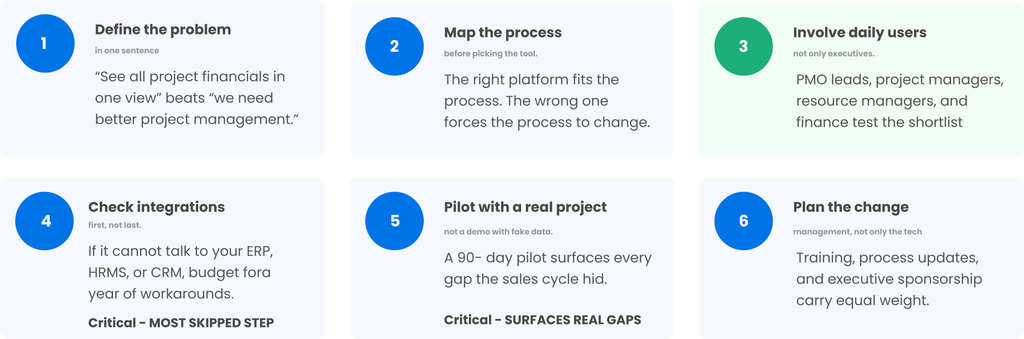
Six steps reduce the risk.
Initial step: statement of problem in one phrase. “We need to see all project financials in one view” versus “we need improved project management” Specific problem calls for specific assessment.
Step two: Map the process before selecting the platform. Document how projects go from opportunity through delivery all the way to invoicing. The correct platform should simply fit to the process. The incorrect platform will drive you to modify the process.
Step three: put the users in. Lead PMOs, project managers, resource managers and finance controllers test the shortlist. The overall fit isn’t apparent to executives who only see the sales demo.
Step four: check integrations first. If the platform doesn’t integrate with your ERP, HRMS, or CRM, add a year of fudge to your budget. Get a working integration as part of the demo-not a slide.
Step five: pilot on a real project. A free trial with dummy data is meaningless. Ninety days of live project, and all the missing pieces show up that you glossed over in the sales cycle.
Six step: plan the change management. The technology is only a part of the adoption. Training, process improvement, also lead to the same level of adoption.
Enterprises that forgo steps four and five start to bear the cost in year two when the platform that seemed so wonderful in the demo can’t actually do the work.
Common Mistakes Enterprises Make
The following three pitfalls seem to be encountered on every implementation.
While all vendors list the same features on their comparison page, depth will trump width, as the saying goes. A tool that does resource management will outperform one that does 40 disparate tasks poorly. You can read more about this pattern in our deep dive on why PSA software can make or break project delivery.
Number two is viewing rollout as a software project rather than a change project. The technical rollout is the easy part. Convincing 300 project managers to update their tasks on a daily basis is the challenge. Under-invest here, and you’ll struggle to get to 40 percent adoption.
The third is; buy for today, not the next three years. Enterprise requirements continue to increase. For 100 users a tool, that’s fine, but the solution has to handle 500 users. The business process that IT has scaled to service today, will need to roll out to a new line of service tomorrow.
For all three, the solution is the same. Reach out to reference customers who are two or three years in. Their feedback shows what the demo conceals.
Signs Your Current Platform Is Failing
Companies don’t go from good platform to bad platform overnight. They pile up over quarters.
The reports aren’t matching. Finance shows a different revenue number than the PMO. Both are based on the same projects.
Managers are disengaged. They hold their project information in spreadsheets, and update the tool only upon request.
You get slip after slip and no one knew it was happening. The dashboard used a green status until after the deadline.
Getting a new project manager to onboard can take weeks. The application is so sophisticated that most new users can’t use the tool without extensive training.
Companies put forth the same questions every time. Utilization, margin, pipeline. If leadership has to ask to see those figures, then the platform isn’t enough.
When multiple signs are presented, the tool has outlived its usefulness. It is time for a replacement conversation.

Integrations That Change the Value Equation
A platform alone tracks projects. Attached to the wider enterprise stack, it becomes a source of truth.
Here are the ones that are most important for enterprise.
ERP integration. Project financials are integrated with the general ledger. No need for reconciliation. Revenue recognition occurs as expected.
HRMS: Data, skills and cost rates all pushed into resource planning. One new hire is days, not weeks to onboard.
CRM integration. Opportunities in the sales pipeline flow straight into the estimate. Opportunities that close as won sales automatically turn into projects.
Time-tracking integration. Timesheets fuel billing and utilization reports. Customers track work in one system, and the data gets to HR and finance instantly.
Communication in Tools. Links to Slack, Teams, and email keep your team in the tools they already use. Meanwhile, all the project data remains in one easy-to-find place.
Companies that don’t think of integration first spend the first year playing catch-up. Companies that do spend it up front, get to reap the rewards in months, not years.
The Role of AI in Modern Platforms
AI isn’t one of our step-by-step items anymore. All four modern-day platforms are today already using it.
Resource matching. It matches open roles with skills, availability and history to find the most suitable worker.
Estimate effort. Based on previous projects of the same configuration, the service can help create an estimate of costs and delivery time.
Risk identification. The platform monitors the leading indicators of risks like task slipping and conflicts in resources and notifies managers before the problem gets serious.
Status summarization. Based on real-time task information, the application generates weekly project status reports for managers that cut down on time.
This is not a fake-out. It’s real. The AI truly does the magic that once took all day.
Gartner’s pioneering 2019 research found that by 2030, 80 percent of project management work will be automated or supported by AI. Despite the roadmap, enterprise buyers must ask vendors, “How are you using AI today?”
How Kytes Approaches Enterprise Delivery
In our work with enterprise IT services, pharma, EPC and GCC clients, the resource plan is the layer upon which Kytes rests for the opportunity to cash cycle. Proposal and estimation, resource assignment, delivery, timesheet capture, invoice and revenue recognition are all contained within a single interface. Any variation in the resource plan instantly affects the financial forecast.
Level of Integration – Kytes integrates with SAP, Oracle, Microsoft Dynamics, and any other enterprise stack your project data can be extracted from these solutions and pushed into the systems that finance and HR are familiar with. The reporting layer provides a single source of truth for the portfolio health, eliminating the need for manual rollup. Learn more about how professional services automation tools work.
That is what distinguishes enterprise class solutions from rebranded team applications.
Deployment Options and Total Cost of Ownership
You’ve got a second choice when you’ve selected the instrument amongst industry buyers: how will you deploy it?
Cloud (SaaS). The vendor hosts the platform. The enterprise pays a monthly per-user fee and receives rolling upgrades, and has no infrastructure responsibility. Buyer subscribes. Vendor hosts the servers. An advantage in that the buyer has less responsibility, but a tradeoff of less control of the release schedule.
On-premise. The platform runs in the enterprise’s own data center. The enterprise controls security, upgrades and data location – making it the choice of regulated industries such as defense, government and some pharma segments. The downside: More IT overhead.
Hybrid. A combination of these. Critical project information is maintained on site, while reporting, collaboration and mobile tiers are located in the cloud. This is an ideal fit for corporates that require everything.
Total cost of ownership goes beyond the license fee. Buyers should model five cost lines over a three-year window.
- License or subscription cost. The per-user fee, quoted annually.
- Implementation cost. Configuration, data migration, and integration work in the first six months.
- Training and change management. Onboarding project managers, resource leads, and finance controllers.
- Ongoing support and admin. A dedicated platform admin is standard for enterprise use, along with a vendor support contract.
- Upgrade or customization cost. Custom workflows and reports that a vendor cannot ship out of the box.
Enterprises that only compare license fees pick the wrong tool. Enterprises that model total cost of ownership pick the tool that lasts.
The Bottom Line
No, the role of a modern platform in an enterprise has evolved. It’s no longer a tool to schedule work. It’s the operating platform that links delivery, resourcing and financials. When it works, executives get the truth in the moment. Delivery teams deliver, rather than manage against the tool. When it fails, the business spends its time trying to reconcile the numbers, chasing the status and putting out fires that a good platform should have identified weeks ago.
The right project management software pays for itself in year one, and grows in value each year after. The wrong one costs three years of pain and a difficult switch. Select the right product carefully. Consult those who use it. Pilot first, buy second. And prepare for the change, not just the product.
Frequently Asked Questions