

Blog Highlights
- Project management software strengthens planning and scheduling by giving IT teams a unified view of all active and upcoming projects, reducing ambiguity and conflicting priorities.
- Structured project planning and scheduling become easier with detailed work breakdowns, dependencies, accurate estimation, and dynamic timelines that adjust to real-time changes.
- The software enhances project scheduling in project management through resource visibility, skill-based allocation, and cross-project workload balancing, preventing burnout and delivery delays.
- Predictive insights, scenario planning, and automated alerts help managers identify risks early, test alternatives, and protect critical milestones across multi-project environments.
- Centralized communication, documentation, and time tracking improve coordination across engineering, QA, DevOps, and infrastructure teams, creating consistency in execution.
- Overall, modern project management software creates a disciplined operating rhythm that supports predictable delivery, clear decision-making, and efficient management of multiple IT projects at once.
Most IT managers don’t wake up thinking about Gantt charts or utilization dashboards. They wake up thinking about the fire that will erupt first. A delayed sprint. A production fix that suddenly becomes mission-critical. A project that looked simple until three other dependencies revealed themselves an hour before stand-up.
The challenge isn’t the volume of work alone. The real complexity emerges when multiple projects overlap, share the same people, and evolve at different speeds. In this environment, planning and scheduling cannot remain a spreadsheet exercise. They need structure, visibility, automation, and a system that adjusts faster than the chaos it tries to control.
That is where project management software becomes essential. Not as a digital filing cabinet, but as the operational brain that aligns work, people, and outcomes across concurrent IT initiatives.
This blog walks through how modern tools make multi-project planning and scheduling possible at scale, what capabilities matter most, and how IT teams can build a predictable delivery rhythm without slowing innovation.
Why Multi-Project IT Teams Struggle With Planning and Scheduling
Coordinating a single IT project is relatively straightforward. Coordinating ten, each with different owners, deadlines, and shared resources, is a different reality. The core difficulties typically fall into four areas:
- Unclear capacity and utilization
Managers often rely on estimates that do not match actual workload. When the next urgent task arrives, they discover too late that a critical team member is already overloaded. - Constant shifting of priorities
Infrastructure upgrades, customer escalations, and new product features often compete for attention. Without a system to orchestrate these shifts, teams lose momentum. - Fragmented information
Work lives in email threads, Jira tickets, shared drives, Teams chats, and personal notes. When information is scattered, planning becomes guesswork. - Dependency blind spots
Every IT project has hidden links — architecture decisions, API integrations, test environments, compliance checks. Teams only feel these dependencies when they break.
Project management software does not magically eliminate these challenges, but it creates the structure and visibility needed to manage them. The next sections break down exactly how.
How Project Management Software Strengthens Planning Across Multiple IT Projects
1. Consolidated Project Landscape for Early Decision Clarity
Good planning starts with knowing what exists. Modern project management tools bring every project — active, upcoming, and stalled — into one shared system. This consolidated view helps leaders:
- See how many parallel initiatives are running.
- Understand the scope, timelines, and ownership of each project.
- Identify early if a new project will collide with an existing one.
This level of visibility reduces the “unknown unknowns” that cause project slippage. It also ensures planning sessions are based on facts, not perceptions.
2. Structured Work Breakdown and Task Hierarchy
For IT teams, vague tasks create ambiguity and delays. Project management software helps break down work into:
- Phases
- Modules
- Tasks
- Sub-tasks
- Dependencies
- Documentation links
- Acceptance criteria
This structured hierarchy makes planning more realistic because every piece of work is clearly defined. Teams no longer rely on broad commitments like “complete the integration” but instead plan for the exact sequence, effort, and responsibility involved.
3. Improved Project Scheduling in Project Management
Scheduling in a multi-project environment depends on timing, workload, and interdependencies. Software transforms this process by offering:
- Drag-and-drop Gantt views
- Milestone tracking
- Critical path identification
- Real-time schedule adjustments
- Automatic roll-ups of delays or scope changes
This creates a living schedule rather than a static one. When a delay happens in one project, the system shows how it affects others — helping managers react proactively.
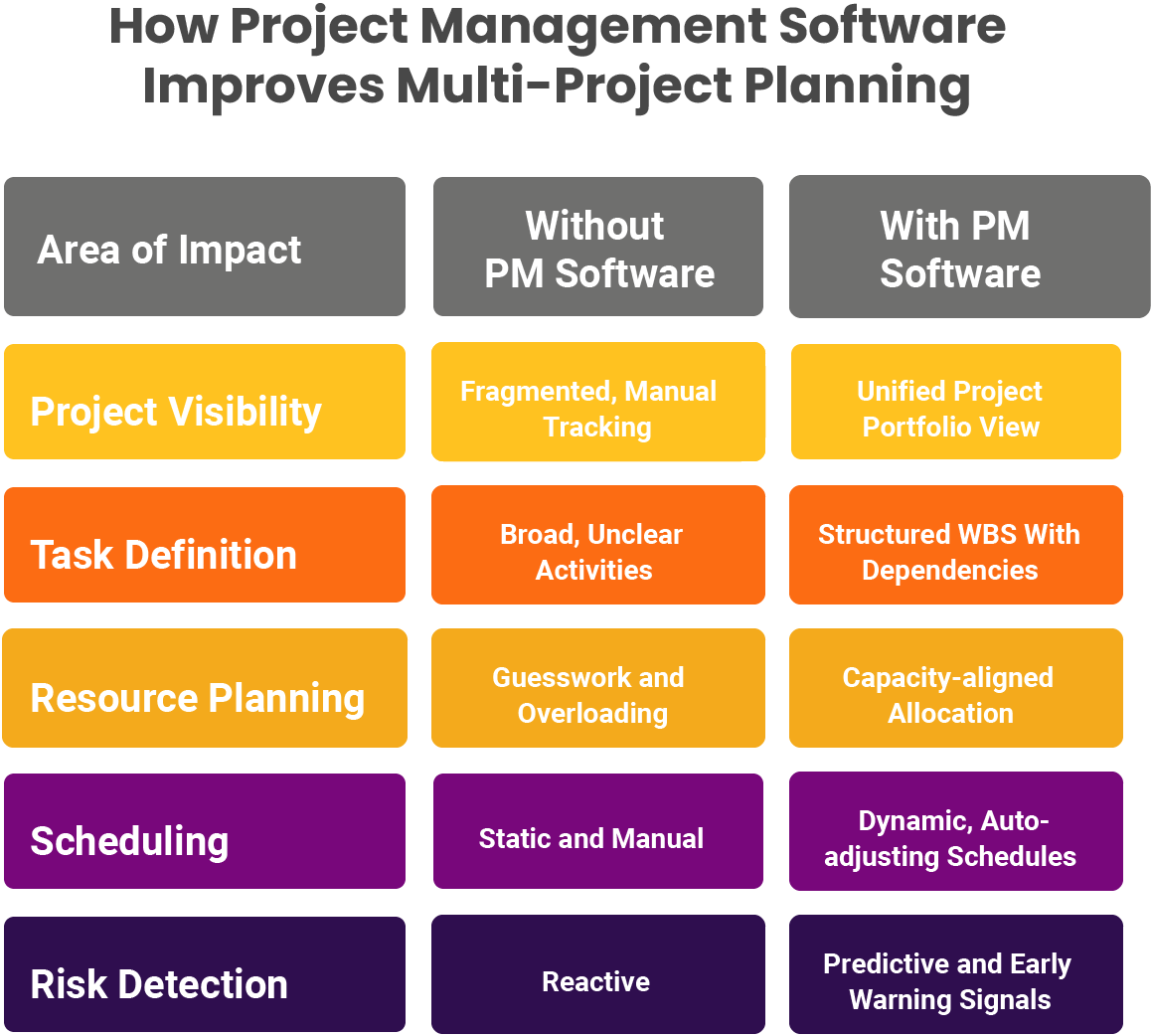
How Project Management Software Enhances Scheduling for Multi-Project IT Teams
1. Resource Planning Based on Real Capacity, Not Assumptions
Most scheduling problems start with resource allocation. Tools provide:
- Real-time utilization dashboards
- Skills-based assignment
- Forecasting for upcoming months
- Conflict identification when the same person is booked twice
This allows IT managers to allocate work accurately, avoid burnout, and ensure that critical resources are available when needed.
2. Cross-Project Workload Balancing
Multi-project scheduling breaks down when teams unknowingly overload one group while others remain idle. Project management platforms allow leaders to:
- Compare workload across teams
- Shift tasks from high-pressure areas to underutilized ones
- Reallocate resources when project timelines tighten
This helps maintain a steady pace of delivery without compromising quality.
3. Scenario Planning for What-If Analysis
IT priorities shift frequently. Project management software supports scenario planning to answer questions like:
- What happens if we advance the release by two weeks?
- Which tasks must move if a critical bug takes priority?
- How does onboarding a new engineer change capacity?
- What if a dependent API or environment becomes unavailable?
Scenario simulation gives leaders clarity without disrupting active work. They can test and validate schedules before committing to them.
4. Automated Alerts, Predictive Delays, and Schedule Intelligence
Modern tools run continuous checks behind the scenes. They flag:
- Overdue tasks
- Approaching milestones
- Conflicting assignments
- Tasks stuck without updates
- Dependencies at risk
With predictive analytics, the system identifies delays before they happen, allowing teams to adjust schedules early.
5. Centralized Communication and Documentation
Most scheduling issues appear when communication is inconsistent. Project management software centralizes discussions by linking conversations directly to tasks, documentation, and decisions. This removes ambiguity and ensures planning is always tied to real context.
Want a smoother way to manage timelines, teams, and workload across multiple IT projects? [Explore Kytes PSA + PPM]
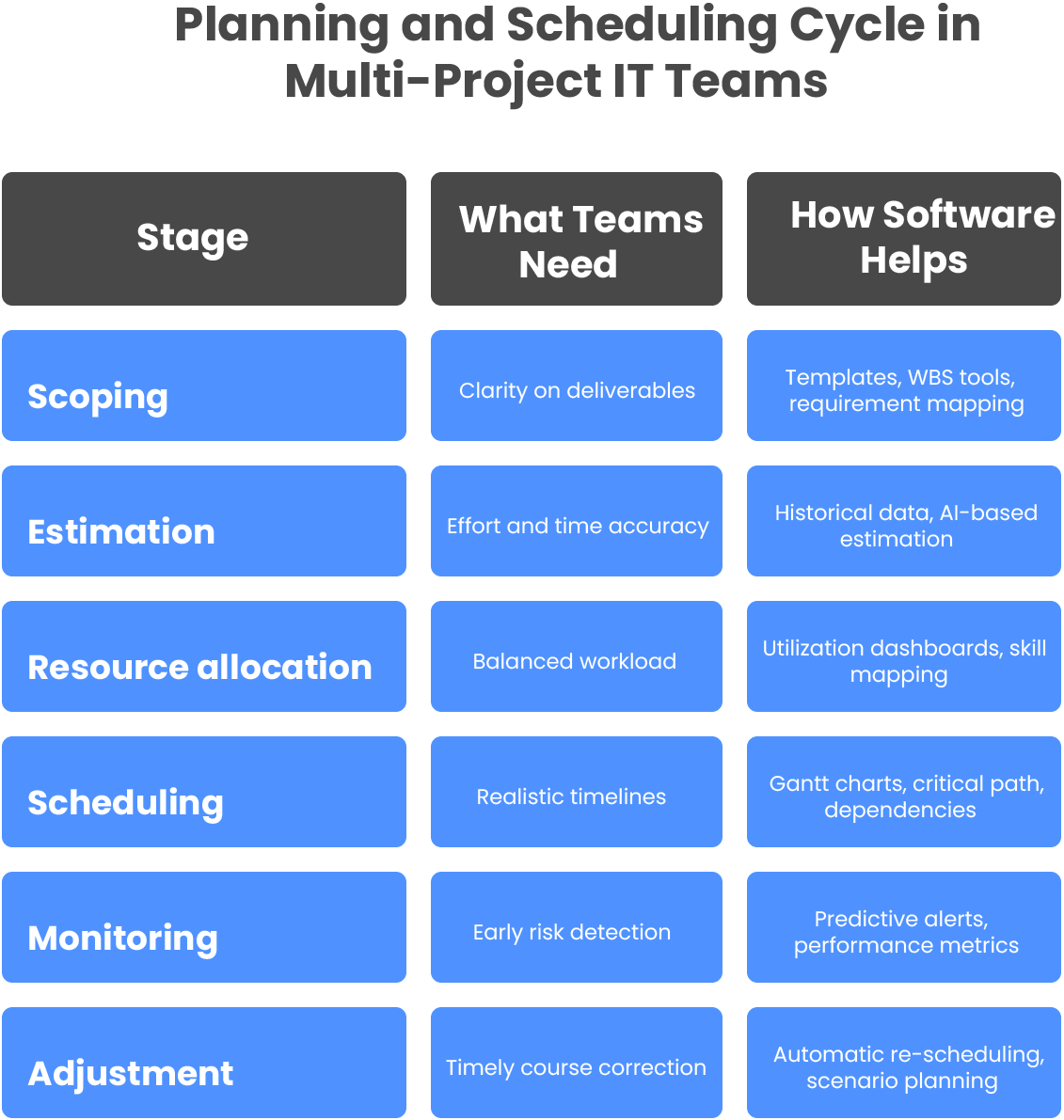
How Project Management Software Supports Continuous Planning in Dynamic IT Environments
Real-time Data Feeds Real-time Decisions
Planning isn’t a one-time activity. As requirements shift, environments change, and new tasks emerge, schedules must evolve. Project management software enables continuous planning because every update feeds instantly into:
- Dashboards
- Resource charts
- Budgets
- Timelines
- Risk indicators
Managers see the latest status without asking for manual updates.
Integrated Time Tracking for Accurate Forecasts
Actual effort captured in timesheets improves future planning. Over time, the system develops a reliable baseline of how long tasks truly take. This reduces optimistic estimation and sets more achievable schedules.
Cross-Functional Coordination With Minimal Friction
IT projects often span engineering, QA, DevOps, infrastructure, and security. Software acts as shared ground where every function sees:
- Their tasks
- Their deadlines
- Their dependencies
- Their blockers
This reduces back-and-forth and speeds up coordination.
Conclusion
When IT teams run multiple projects at the same time, planning and scheduling decide whether delivery feels smooth or chaotic. Project management software provides the framework for this structure. It consolidates information, clarifies responsibility, allocates resources with precision, and adapts schedules as priorities change.
The result is a delivery environment where teams move confidently, project managers make informed decisions, and leadership finally sees reliable progress without chasing updates.
These tools don’t simplify work. They simplify how work is managed. And that is what sets predictable, high-performing IT organizations apart.
About Kytes
Kytes is an AI-enabled [PSA + PPM] platform built for teams that run multiple IT projects at scale. It offers end-to-end visibility across people, projects, finances, and delivery operations. With intelligent planning, dynamic scheduling, automated tracking, and unified workflows, Kytes helps teams deliver with accuracy and confidence.